Usage
Example
Here is a minimal example of a Click command that uses sphinx-click.rst_to_ansi_formatter and a reST formatted docstring:
import click
from sphinx_click.rst_to_ansi_formatter import make_rst_to_ansi_formatter

base_url = "https://example.github.io/example/main/"
@click.command(cls=make_rst_to_ansi_formatter(base_url))
def minimal():
    """``minimal-example`` displays a `minimal` example of a Click command that uses
    ``sphinx-click.rst_to_ansi_formatter`` and its method ``make_rst_to_ansi_formatter()``
    to convert this reST formatted docstring to an ANSI formatted string to be displayed
    in a terminal.

    See :doc:`Minimal example <minimal>` for more *information*.

    EXAMPLES
    ========

    Some examples ::

      $ minimal-example
      $ minimal-example --help


    For more information about the minimal example script see :doc:`/history`.
    """
    pass
Notice the line @click.command(cls=make_rst_to_ansi_formatter(base_url)).
Without the custom cls value the console help output
would look like this (gnome-terminal):
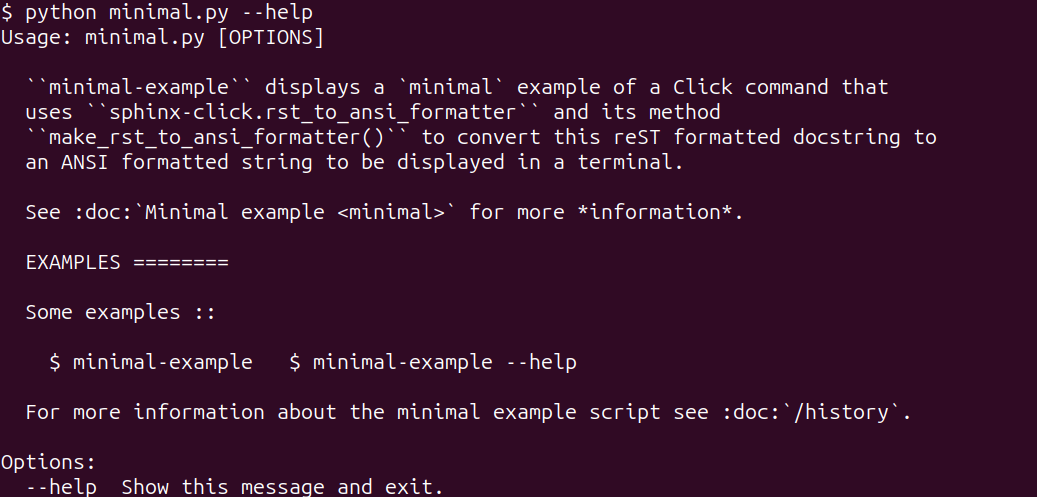
Notice for example, that the two lines in the code block have been wrapped into a single
line. This would likely be confusing and difficult to read for a user of your app.
Also notice that the links are not substituted by the target URL
but rather rendered unprocessed as e.g. :doc:`Minimal example <minimal>`. Not very user-friendly!
However, by using the custom cls value in the code example,
the console output becomes:
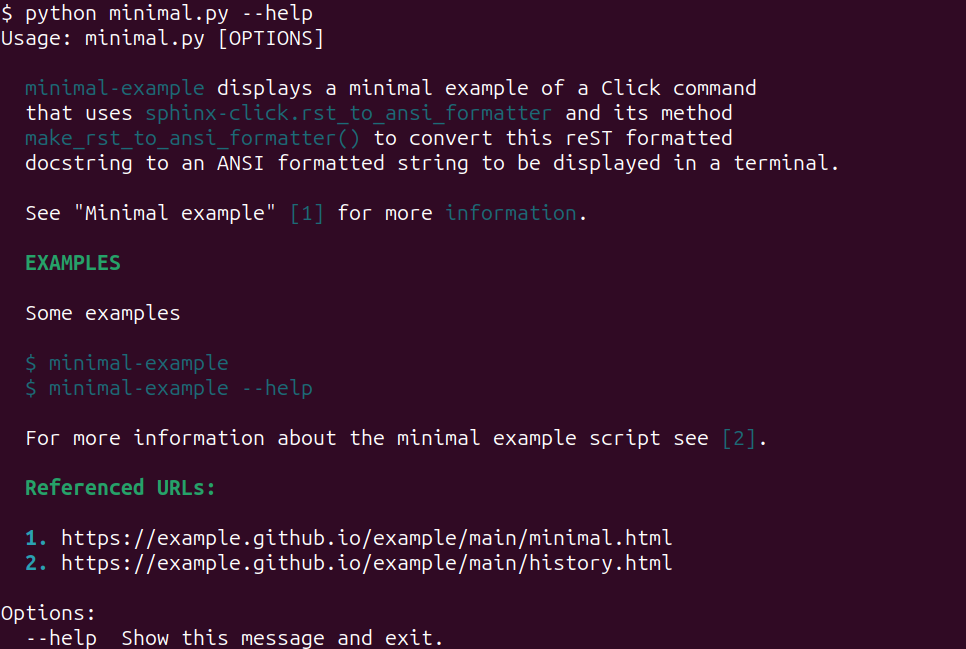
which is hopefully more user-friendly.
Subclassing
The RstToAnsiCommand and RstToAnsiGroup classes can be subclassed instead
of calling make_rst_to_ansi_formatter. Set the base_url class attribute,
and optionally colors:
import click
from sphinx_click.rst_to_ansi_formatter import RstToAnsiGroup

class DocGroup(RstToAnsiGroup):
    base_url = "https://example.github.io/example/main/"

@click.group(cls=DocGroup)
def cli():
    """See :doc:`Minimal example <minimal>` for more *information*."""
A type checker such as mypy cannot check a class that inherits from the class
make_rst_to_ansi_formatter returns, since that class is built at runtime.
It can check a class that inherits from RstToAnsiCommand or RstToAnsiGroup.
Signature
The signature for make_rst_to_ansi_formatter is:
- class sphinx_click.rst_to_ansi_formatter.formatter.RstToAnsiCommand(name, context_settings=None, callback=None, params=None, help=None, epilog=None, short_help=None, options_metavar='[OPTIONS]', add_help_option=True, no_args_is_help=False, hidden=False, deprecated=False)
Bases:
FormatHelpMixin,CommandA
click.Commandwhose reST help text is displayed with ANSI colors.Subclass it and set
base_url, and optionallycolors, to configure the conversion. Seemake_rst_to_ansi_formatter()for their meaning.
- class sphinx_click.rst_to_ansi_formatter.formatter.RstToAnsiGroup(name=None, commands=None, invoke_without_command=False, no_args_is_help=None, subcommand_metavar=None, chain=False, result_callback=None, **kwargs)
Bases:
FormatHelpMixin,GroupA
click.Groupwhose reST help text is displayed with ANSI colors.Subclass it and set
base_url, and optionallycolors, to configure the conversion. Seemake_rst_to_ansi_formatter()for their meaning.
- sphinx_click.rst_to_ansi_formatter.formatter.make_rst_to_ansi_formatter(base_url, colors=None, group=False)
Create a reST to ANSI text formatter class.
- Overloads:
base_url (str), colors (ColorDict | None), group (typing.Literal[True]) → type[RstToAnsiGroup]
base_url (str), colors (ColorDict | None), group (typing.Literal[False]) → type[RstToAnsiCommand]
base_url (str), colors (ColorDict | None), group (bool) → type[RstToAnsiCommand] | type[RstToAnsiGroup]
- Parameters:
base_url (
str) – The base url for the documentation page. This will be used to construct URLs for the Sphinx reST:doc:role.colors (
dict[str,dict[str,Any]] |None) – The colors to use when translating reST formatting codes. If not provided, default colors will be used. The dictionary should have keys “heading”, “url”, and “code” with values that are dictionaries with keys “fg” and “style” that specify the foreground color and style to use. The default value is:{ "heading": {"fg": Fore.GREEN, "style": Style.BRIGHT}, "url": {"fg": Fore.CYAN, "style": Style.BRIGHT}, "code": {"fg": Fore.CYAN, "style": Style.DIM}, }. For more information about the “fg” and “style” values, see the colorama documentation.group (
bool) – If True, aclick.Groupwill be returned, otherwise aclick.Commandwill be returned. The default is False.
- Return type:
type[RstToAnsiCommand] | type[RstToAnsiGroup]- Returns:
Returns a sub class of
RstToAnsiCommand, or ofRstToAnsiGroupwhengroupis True, that can be used to convert help text from reST to ANSI terminal color encoded text